
Behind the Module: Why Action Plans Are the Secret to Stress-Free Reporting
Picture this: it’s the start of a new program year. Your inbox is full, your calendar already looks like a jigsaw puzzle, and you’re staring at a blank page wondering how to capture all the ideas buzzing around. Do you jump right into scheduling events? Do you try to organize your notes from last year? Or do you just roll with it and hope for the best?
Most of us have been there. It’s that moment where excitement meets uncertainty. You know you want to make an impact, but the path forward feels fuzzy.
This is exactly why PEARS begins with Action Plans. They’re designed to give you a place to pause, set your direction, and bring some calm to the chaos. Instead of asking you to do all the things right away, Action Plans ask you to capture the “why” before the “what.”
Why Action Plans Matter
Planning isn’t always glamorous, but it’s where impact begins. Action Plans help you:
- Bring clarity: See your priorities in one place instead of being pulled in ten directions.
- Build alignment: Make it easy for supervisors, colleagues, and partners to see and support your goals.
Connect effort to impact: Tie activities to measurable outcomes so nothing feels like a disconnected task. One Extension educator told us, “Before PEARS, my programs were like puzzle pieces scattered on the table. Action Plans helped me see the picture on the box.”
How the Action Plan Module Works
The Action Plans module in PEARS is simple on purpose. It walks you through the essentials of good planning.
1. Give Your Plan a Name
Choose a clear, meaningful title. For example, “Healthy Communities Initiative – Youth Engagement” is a lot more useful than “Program #3.” Add a short description for context.
Pro Tip: Keep plan titles short and memorable. If you can’t remember the name without looking it up, it’s probably too long. form, institutions can move beyond anecdotal stories to evidence of mutual learning and shared achievement.
2. Connect to Bigger Frameworks
Link your plan to state strategic plan, federal or national reporting requirements. This shows your local work contributes to broader goals (a makes reporting much less painful later).
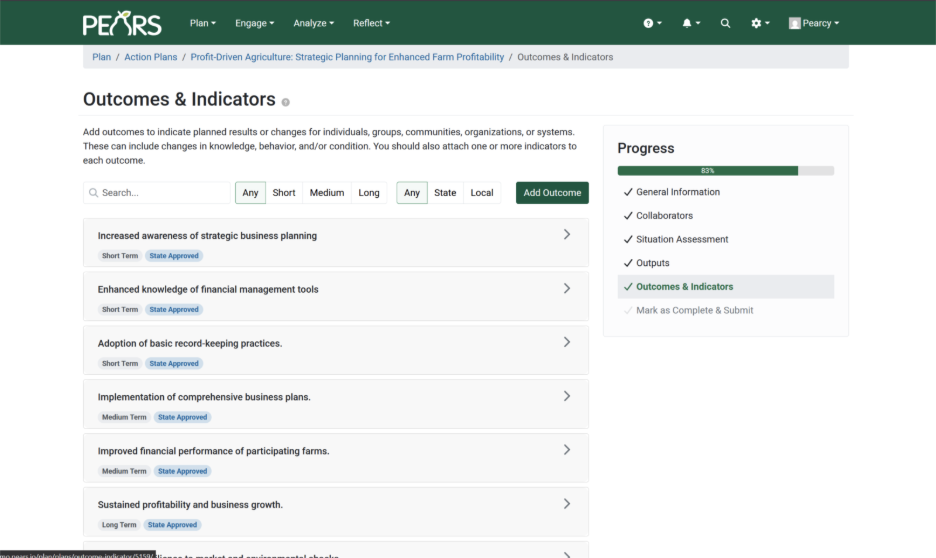
3. Define Outcomes and Indicators
Outcomes are the changes you want to see. Indicators show how you’ll measure them. For example:
- Outcome: Families increase physical activity.
- Indicator: Percentage of participants who report exercising at least 30 minutes a day, 5 days a week.
4. Set the Stage for Activities
When you log Program Activities, Partnerships, or Surveys in PEARS, tie them back to your Action Plan. This turns isolated records into a cohesive story.
Tips for Making Action Plans Useful
Think of it as a draft, not a contract. Plans can (and should) evolve. Use them as a conversation starter. Share drafts in a team meeting to spark alignment. Be realistic. Focus on a few meaningful goals you can follow through on.
Check in regularly. Revisit mid-year to celebrate progress and adjust as needed.
Why Start with an Action Plan
Skipping Action Plans may feel faster, but by year’s end you risk scrambling to explain how your work fits together. With an Action Plan, you can clearly say:
Here’s what we set out to do. Here’s what we did. Here’s what changed as a result.
That clarity makes reporting smoother and your impact story stronger.
Bringing It All Together
At the heart of it, Action Plans are about intention. They help you:
- Connect your daily work to the bigger picture.
- Stay focused when things get hectic.
- Create a thread that ties all your PEARS entries together.
So next time you log into PEARS, don’t skip past the Action Plans module. Take a little time to name your goals, link them to outcomes, and set the stage for your activities. Those seeds of intention will grow into a story of impact you can be proud to share.
Ready to try it out? Log in to PEARS to start or revise an Action Plan today! Don’t have PEARS and want to learn more, reach out to info@canopyteam.org.
Subscribe to our blog for an email when we post new content: